

AI in Bookkeeping: What Helps — and What Still Needs a Human

AI is changing bookkeeping — but good financial decisions still require human judgment.
Artificial intelligence is everywhere right now — including bookkeeping.
Between automated bank feeds, smart transaction categorization, and AI-generated financial insights, many small business owners are asking:
“Do I still even need a bookkeeper?”
The short answer?
Yes — but the role is changing.
AI can absolutely improve bookkeeping.
It can make things faster, reduce repetitive work, and help organize data.
But clean books still require something AI doesn’t have:
Context, judgment, and experience.
Here’s where AI helps — and where a human still matters.
🤖 What AI Actually Helps With
Let’s start with the good news.
AI is genuinely useful in bookkeeping when it comes to repetitive tasks.
Things like:
Suggesting categories for transactions
Recognizing patterns in spending
Importing and organizing bank activity
Flagging duplicate transactions
Speeding up repetitive coding work
For example:
If you buy office supplies from the same vendor every month, bookkeeping software may learn the pattern and suggest the category automatically.
That saves time.
And saving time is good.

⚠️ Where AI Gets Bookkeeping Wrong
This is the part people don’t talk about enough.
AI can categorize transactions.
It cannot understand business context.
Example:
You eat lunch at a restaurant.
AI may code it as:
Meals & Entertainment
But was it:
A client meeting?
Owner personal spending?
Employee travel meal?
Staff lunch during training?
Same vendor.
Completely different bookkeeping treatment.
Or maybe a software charge suddenly doubles.
AI sees:
“Looks similar to last month.”
A human sees:
“Why did this subscription jump from $49 to $399?”
That difference matters.
🚩 Garbage In = Garbage Out
AI only works well when the bookkeeping system underneath is healthy.
If the books already have:
Misclassified transactions
Unreconciled accounts
Duplicate entries
Workflow issues
AI often accelerates the mess instead of fixing it.
In other words:
Faster bookkeeping does not automatically mean better bookkeeping.

🧠 What Still Needs a Human
This is where a good bookkeeper becomes more valuable — not less.
A human still matters for:
Financial judgment
Does this transaction belong here?
Does this make sense?
Is something unusual happening?
Clean-up work
AI is poor at untangling years of messy bookkeeping.
Humans identify patterns, investigate problems, and rebuild reliable reports.
Reconciliations
Bank accounts still need verification against statements.
Automation helps — but reconciliation requires review.
Interpreting reports
A Profit & Loss statement doesn’t explain itself.
A good bookkeeper helps answer:
“Why is profit down?”
“Why is cash tight?”
“What changed?”
That’s decision support — not data entry.
💡 The Future of Bookkeeping Isn’t AI vs Humans
It’s AI plus humans.
The best bookkeeping today combines:
Smart automation
Efficient workflows
Human oversight
Financial experience
Think of AI as a calculator.
Helpful?
Absolutely.
Replacing judgment?
Not even close.

What This Means for Small Business Owners
AI can make bookkeeping faster.
But speed alone doesn’t create clarity.
Clean books, accurate reports, and useful financial decisions still require human review.
Especially when real money — and tax consequences — are involved.
📍 How I Help
At Go Get Geek!, I combine smart technology with real bookkeeping expertise to help small businesses:
Keep QuickBooks Online organized
Clean up messy books
Reconcile accounts correctly
Produce accurate, decision-ready financial reports
Because bookkeeping should help you understand your business — not just automate it.
The Murrin Decision: How Long Should You Keep Tax Records?
If you’ve ever asked, “How long do I actually need to keep my tax records?”—you’re not alone.
A recent court case, Murrin v. Commissioner, is a great reminder that the answer isn’t always as simple as “three years.”
Let’s break it down in plain English.
What Was the Murrin Decision About?

In the Murrin case, the taxpayer was audited and asked to support deductions from prior years—but didn’t have the records anymore. The IRS's unlimited audit window under Section 6501(c)(1) applies even when the taxpayer had absolutely no intent to evade taxes.
The result?
👉 The IRS disallowed the deductions.
👉 The taxpayer lost the case.
The key takeaway:
If you can’t prove it, you can’t deduct it—even if it was legitimate.
The “3-Year Rule” (and Why It’s Misleading)
You’ve probably heard:
“Keep tax records for 3 years.”
That comes from the general IRS statute of limitations—the time the IRS has to audit a return.
But here’s where it gets tricky:
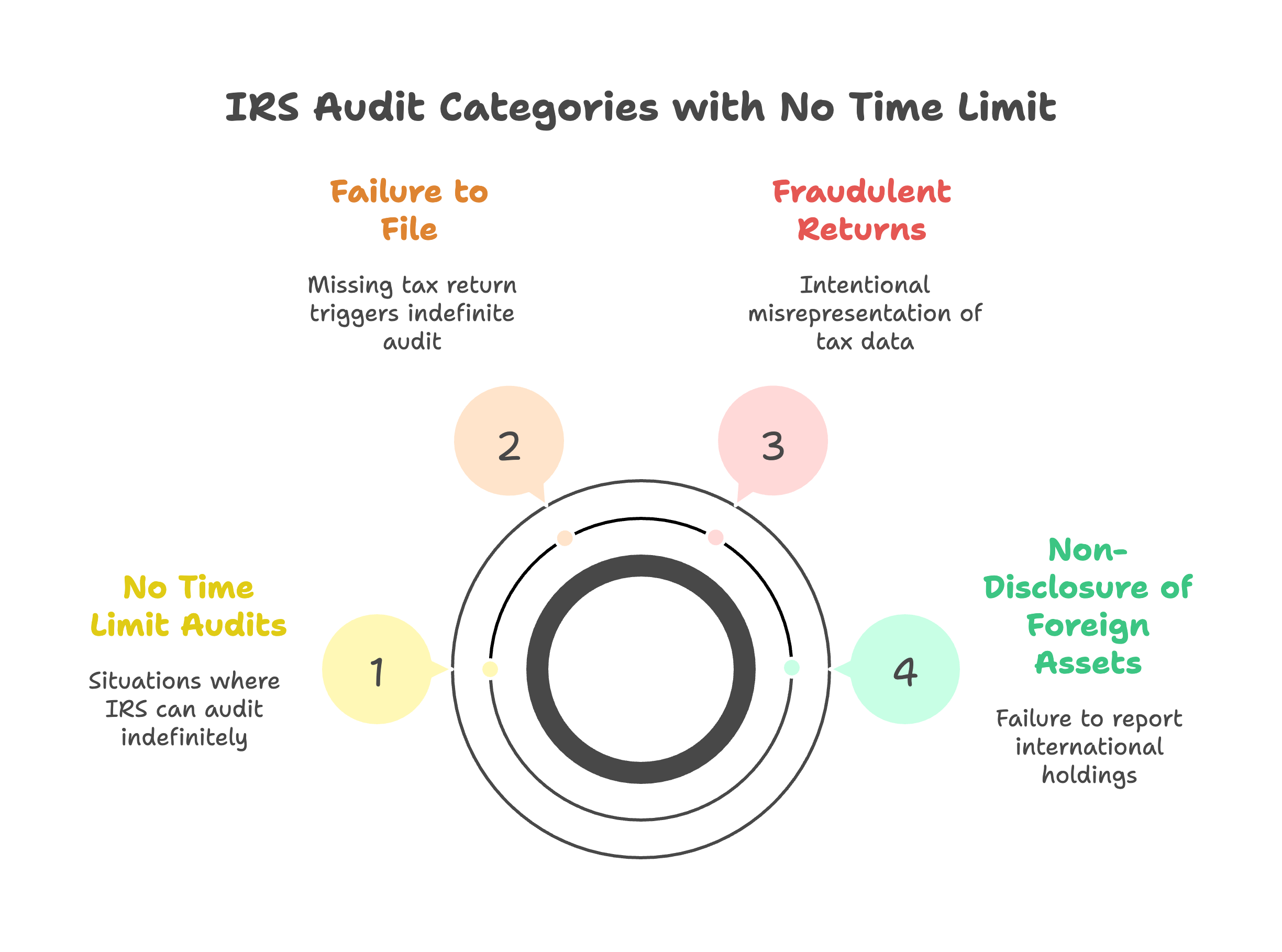
The IRS can go back longer if:
You underreport income by more than 25% → 6 years
There’s fraud or no return filed → no limit
You claim certain losses or credits → longer review periods
You carry items forward (like depreciation or NOLs)
So in reality…
👉 3 years is the minimum—not the safe rule.
What You Should Keep (and For How Long)

Here’s a practical breakdown for your clients:
1. Tax Returns
Keep forever
They’re your financial “history file”
2. Supporting Documents (Receipts, Expenses, Bank Statements)
Minimum: 3 years
Safer: 6–7 years
This includes:
Expense receipts
Bank & credit card statements
1099s, W-2s, etc.
3. Assets & Depreciation Records

This is where most people mess up.
👉 Keep for the life of the asset + 3–7 years after disposal
Examples:
Equipment purchases
Vehicles
Real estate
Why?
Because the IRS can audit the gain/loss calculation years later, and that depends on your original records.
4. Business Ownership & Entity Documents
Keep forever
Includes:
Formation docs
Ownership records
Equity contributions
Real-World Example (Why This Matters)

Let’s say a client:
Bought equipment in 2018
Fully depreciated it
Sold it in 2025
If they tossed the 2018 records?
👉 They may not be able to prove basis
👉 That could mean paying tax on more gain than necessary
This is exactly the type of situation cases like Murrin highlight.
The Practical Rule I Recommend
👉 Keep everything for 7 years minimum
👉 Keep asset-related records much longer
👉 Store it digitally so it’s not a burden
Storage is cheap. Recreating records during an audit is not.
A Better Way to Store Receipts (Without the Paper Pile)
Keeping records doesn’t mean keeping stacks of paper.
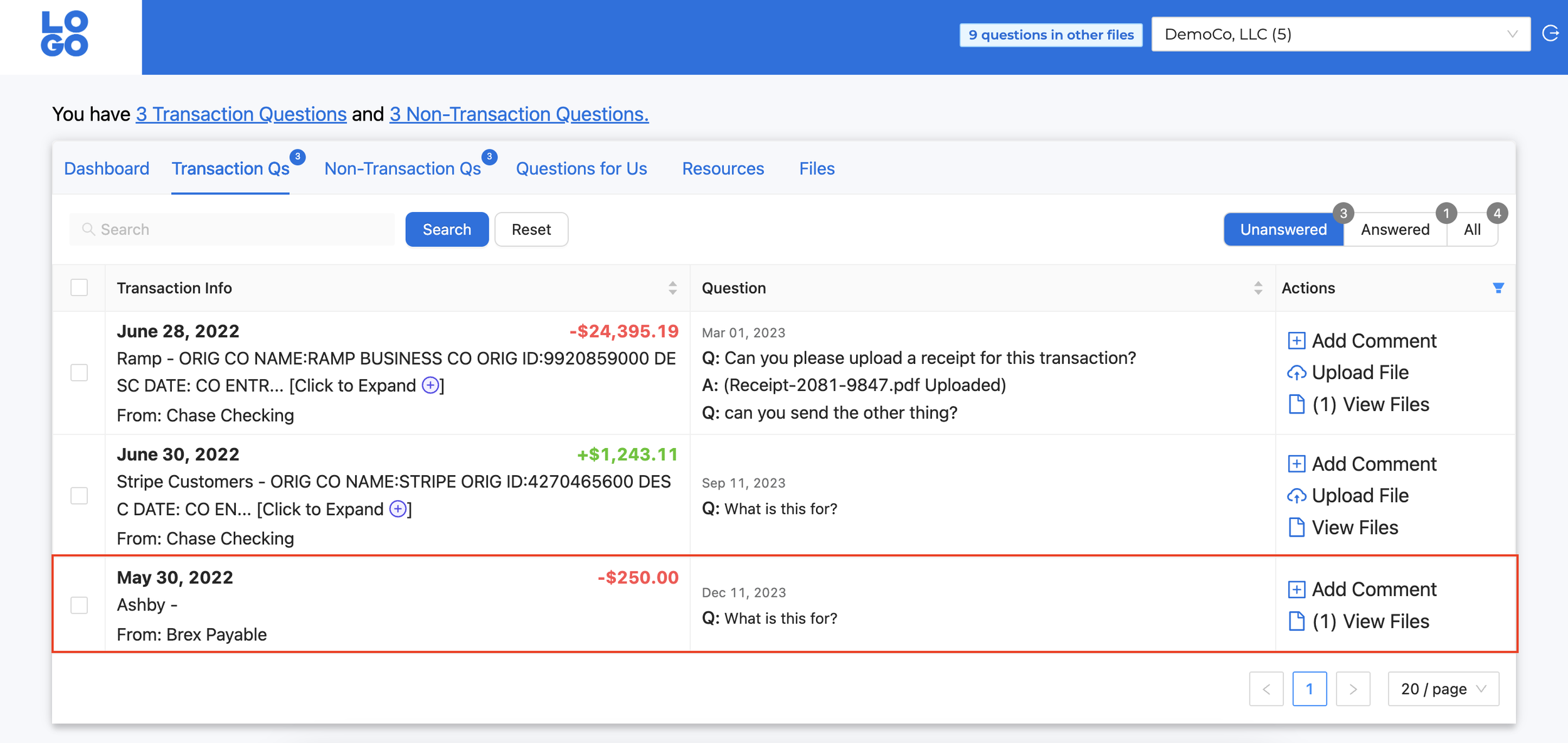
The easiest (and most reliable) way to stay organized is to store everything digitally—and attach documentation directly to the transaction.
Here’s how that works in practice:
👉 Upload receipts to a secure client portal
👉 Each receipt is reviewed and matched to the correct transaction
👉 The document is attached directly inside QuickBooks Online
So instead of digging through folders later…
Everything is already where it should be.
Why This Matters
If the IRS ever asks questions:
You don’t have to search your email
You don’t have to dig through paper files
You don’t have to guess what a charge was
👉 It’s all tied directly to the transaction in your books
What I Recommend to Clients
Keep it simple:
Upload receipts as you get them (or once per week)
Use a single system—not random folders
Let your bookkeeping system do the organizing for you
This turns recordkeeping from something you “catch up on”…
into something that’s handled automatically throughout the year.
The Real Benefit
This isn’t just about audits.
It’s about:
Cleaner books
Faster month-end close
Fewer questions and back-and-forth
And no scrambling at tax time
Final Takeaway
The Murrin decision reinforces a simple truth:
Good bookkeeping isn’t just about reports—it’s about documentation.
If records are missing, even valid deductions can disappear.
Want Help Staying Organized?
If your books (or your document storage) are a mess, that’s exactly what we fix.
Clean books. Clear records. No scrambling if the IRS ever asks questions.

The 5 Signs Your Books Need a Clean-Up (Before Tax Season Gets Ugly)

Messy books usually start small — until tax season arrives.
Most business owners don’t realize their bookkeeping needs attention until something forces the issue.
Usually it’s:
Tax season stress
A CPA asking uncomfortable questions
Cash flow that doesn’t make sense
Or reports that simply don’t look right
The reality is that bookkeeping problems build slowly over time — and the longer they sit, the harder (and more expensive) they become to fix.
Here are five warning signs I commonly see when reviewing books for Phoenix small businesses.
🚩 1. Your Bank Accounts Aren’t Reconciled
This is the biggest red flag.
If accounts aren’t reconciled monthly, your financial reports quickly become unreliable.
Common symptoms include:
Ending balances that don’t match statements
Duplicate transactions
Missing expenses or deposits
Numbers changing unexpectedly month to month
Reconciliation isn’t optional bookkeeping maintenance — it’s the foundation everything else sits on.

🚩 2. Uncategorized Transactions Keep Piling Up
If your bookkeeping shows dozens (or hundreds) of transactions categorized as:
Uncategorized Expense
Ask My Accountant
Suspense or clearing accounts
…it usually means bookkeeping has fallen behind.
These transactions create inaccurate reports and often lead to missed deductions or incorrect financial decisions.
Small problems compound quickly here.
🚩 3. Your Profit Looks Good — But Cash Feels Tight
This is one of the most common frustrations business owners experience.
Your Profit & Loss statement shows profit, yet:
The bank balance feels low
Credit cards keep growing
Taxes come as a surprise
This disconnect typically means timing issues, misclassifications, or incomplete bookkeeping.
Your reports may technically run — but they’re not telling the real story.

🚩 4. Negative Balances Appear in Strange Places
Certain accounts should almost never be negative.
Examples I frequently see during clean-ups:
Negative Undeposited Funds
Negative Accounts Receivable
Vendor balances that don’t make sense
Old transactions lingering for years
These usually signal workflow issues rather than simple mistakes — and they rarely fix themselves.
🚩 5. Your Accountant Requests Adjustments Every Year
If your CPA regularly says things like:
“We had to make several adjustments.”
“Your books needed cleanup.”
“Next year let’s try to keep things cleaner.”
That’s a strong indicator your bookkeeping system needs improvement.
Clean books reduce tax prep costs, stress, and surprises.

✅ The Good News
Most bookkeeping issues are completely fixable.
In many cases, a structured clean-up project can:
Restore accurate financial reports
Prepare books for tax filing
Improve cash visibility
Create a solid foundation going forward
The earlier problems are addressed, the easier the solution becomes.
💡 When to Consider a Bookkeeping Clean-Up
If you recognize two or more of these signs, it’s usually time for a professional review.
A clean-up isn’t about assigning blame — it’s about getting clarity so your numbers actually support business decisions.
📍 How I Help Phoenix Business Owners
At Go Get Geek!, I help small businesses:
Clean up and organize QuickBooks Online
Reconcile accounts properly
Produce tax-ready financial statements
Transition into reliable monthly bookkeeping
Because accurate books shouldn’t only exist once a year at tax time.