

Pay Bills for Free in QuickBooks

There is now a newer, upgraded version of the bill payment capability in QuickBooks Online. Previously, there was a scaled-down version of Bill.com’s bill payment service, but it incurred a surcharge.
The new offering, powered by Melio, enables small businesses to pay bills directly within QuickBooks. The service is free if paying with a bank transfer or debit card. There is a fee, however, if you use a credit card, currently 2.9%.
This means that businesses no longer have to use checks with their bank’s routing and account number on them, which can be dangerous and subject to fraud. However, an actual check can still be issued with this service if a bank transfer (ACH) is not preferred or available, such as to an individual without a bank account.

Cannot Connect Citibank Login (Checking & Credit Card) to More Than One QuickBooks Online Account at a Time.

Since QuickBooks Online started using OAuth to connect with Citibank, I can no longer sync with 2 separate QuickBooks Online accounts. After connecting to one QBO account, it disconnects from my 2nd QBO account. When I reconnect to my 2nd QBO account, it disconnects from the 1st one. I only have this problem with Citibank where it will authorize Intuit as an app to only one QuickBooks Online account at a time. This didn't happen with the older connection type.

I have other cards/accounts with Barclays Bank, Bank of America, Discover that I have connected in both QBO accounts that sync with no problems. I wish that QBO developers would talk to Citibank developers as if I call Citi, they say it's a QuickBooks problem and when I have contacted Intuit, they say it's a Citi problem. I can't believe that I am the only one with 2 QBO accounts (one for business and one for personal) that have the same Citibank accounts in both.
I was finally able to get in touch with someone from Citibank's social media team who was very helpful. Apparently, this is an old "known" issue that still hasn't been fixed by Citibank. They have taken my feedback and forwarded it on, but they said it probably won’t be fixed anytime soon. I would suggest that anyone else that is having the same issue contact Citibank so they can see how many users this is impacting and fix it. I used Twitter as my method of contacting them @AskCiti.
Essentially, Citibank has security settings that will only authorize QuickBooks Online as an app with access unique to one company ID at a time. And even though a new Citi connection uses the newer OAuth protocol, when the connection breaks, the message to Update now in QuickBooks Online implies that it was using the old bank type connection (see image). Citibank needs to be pressured to fix it so that multiple QBO accounts can have access to the same Citi accounts. I would pressure Intuit too to contact Citibank and let them know how to fix this issue, which should be pretty easy since all other banks are able to connect this way. I have a post on the QuickBooks Community that addresses this issue.


Set Up Automatic Reminders For Overdue Invoices in QuickBooks

While not a major update like other updates usually announced in monthly webinars that I regularly attend, this new feature in QuickBooks Online is one that many users have been waiting for. Being able to email invoices and track their read status in QBO has been a game changer. But for small businesses that have a lot of open invoices, going after overdue vendors has been a challenging task. Now it is possible to set up multiple automatic email reminders for invoices.
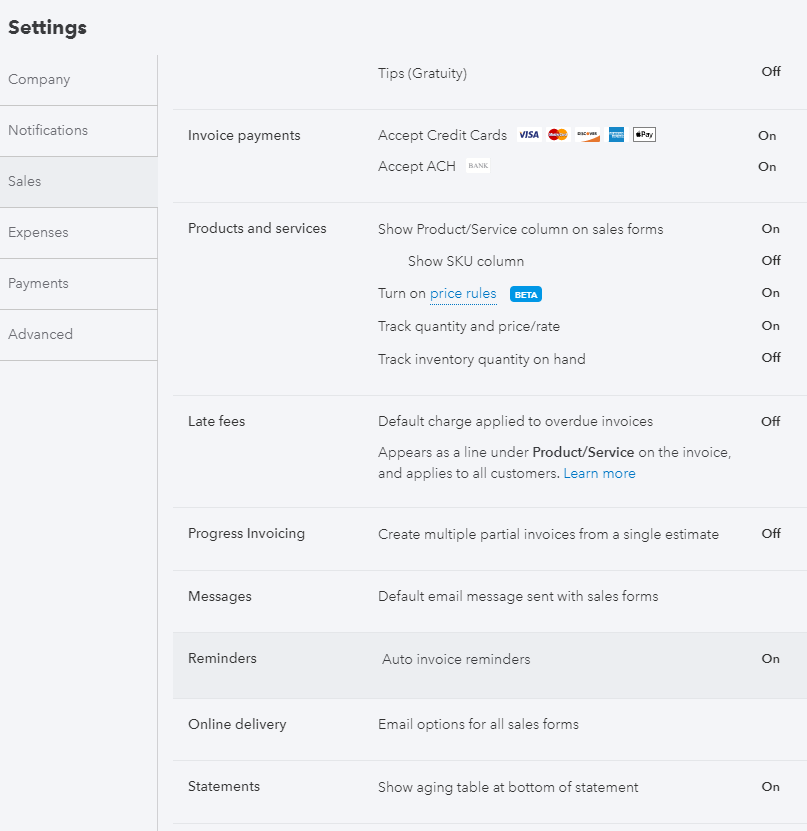
How to set it up
Click on the Gear icon and go to Account and Settings under Your Company.
On the Sales tab, scroll down to Reminders.
Check box for Auto invoice reminders.
You can create up to three automatic reminders. I suggest having one before the due date and the remaining two for overdue invoices.
Click Done.
